Preview Widget
Ninetailed (acquired by Contentful in 2024) · 2023
Overview
Ninetailed is a personalization and experimentation technology that helps brands deliver tailored experiences efficiently.
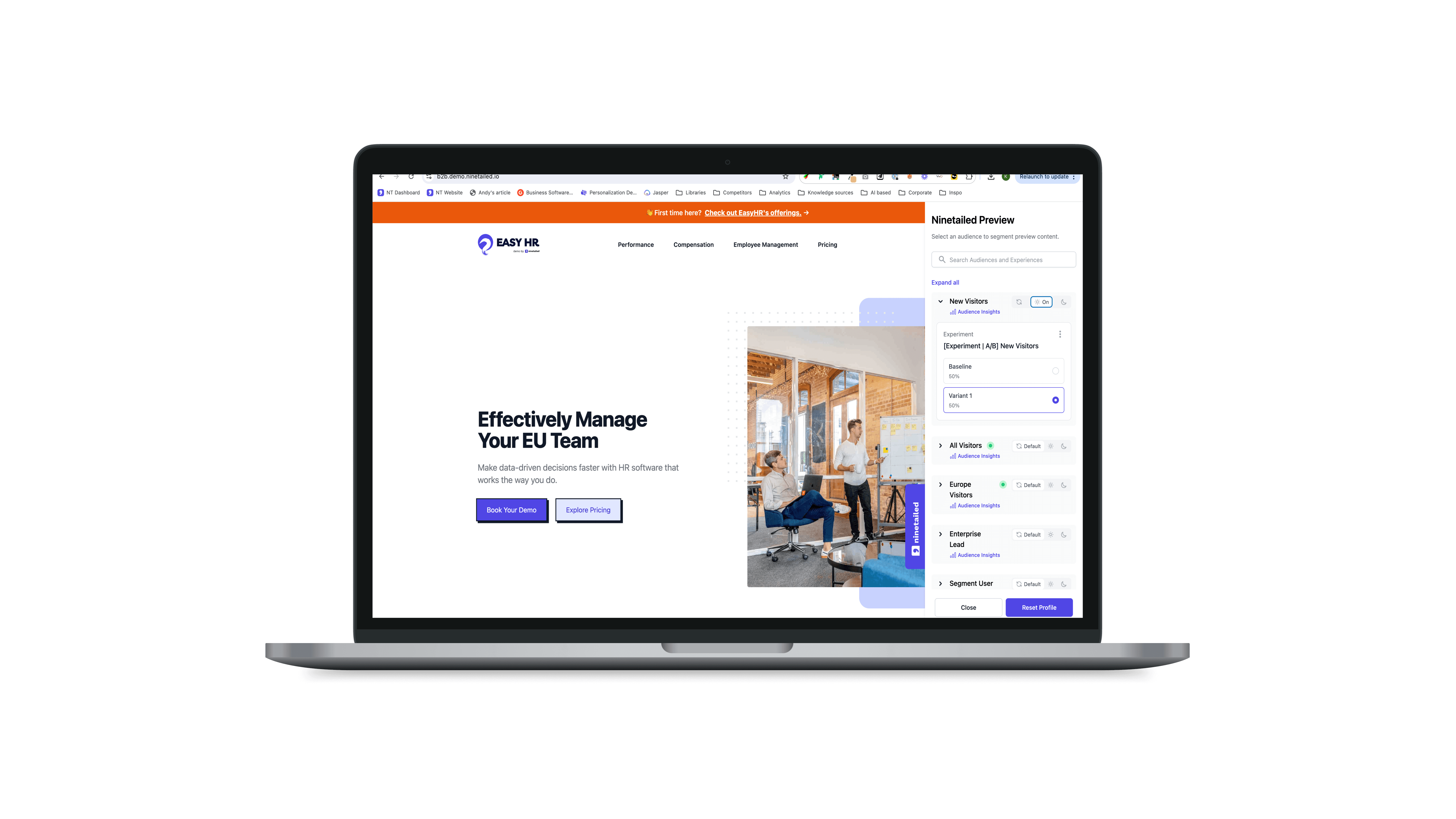
As the Lead Product Designer, I redesigned the Preview Widget, a core product feature that lets users instantly preview how their content behaves across audience segments and experiments before publishing.
Overview
Ninetailed is a personalization and experimentation technology that helps brands deliver tailored experiences efficiently.
As the Lead Product Designer, I redesigned the Preview Widget, a core product feature that lets users instantly preview how their content behaves across audience segments and experiments before publishing.
Overview
Ninetailed is a personalization and experimentation technology that helps brands deliver tailored experiences efficiently.
As the Lead Product Designer, I redesigned the Preview Widget, a core product feature that lets users instantly preview how their content behaves across audience segments and experiments before publishing.
Impact
+32% increase in user interaction
Reduced workflow friction across personalization and A/B testing setup
Improved integration efficiency with Contentful Live Preview
Impact
+32% increase in user interaction
Reduced workflow friction across personalization and A/B testing setup
Improved integration efficiency with Contentful Live Preview
Impact
+32% increase in user interaction
Reduced workflow friction across personalization and A/B testing setup
Improved integration efficiency with Contentful Live Preview
Role
Lead Product Designer
Role
Lead Product Designer
Role
Lead Product Designer
Responsibilities
UX/UI
Design System
Prototyping
Responsibilities
UX/UI
Design System
Prototyping
Responsibilities
UX/UI
Design System
Prototyping
Problem
The existing Preview Widget needed to better reflect Ninetailed’s full product offering. To achieve this, we planned to introduce differentiation between personalization and experimentation, requiring a comprehensive redesign of the widget’s concept, user experience, features, and flows to enable users to seamlessly create and preview experiences.
Problem
The existing Preview Widget needed to better reflect Ninetailed’s full product offering. To achieve this, we planned to introduce differentiation between personalization and experimentation, requiring a comprehensive redesign of the widget’s concept, user experience, features, and flows to enable users to seamlessly create and preview experiences.
Problem
The existing Preview Widget needed to better reflect Ninetailed’s full product offering. To achieve this, we planned to introduce differentiation between personalization and experimentation, requiring a comprehensive redesign of the widget’s concept, user experience, features, and flows to enable users to seamlessly create and preview experiences.
Product statement
The Preview Widget had numerous usability and visual issues that required addressing, including:
Users couldn’t share specific combinations of experiences outside their environment.
There was no support for experiment previews, leaving half of our user base underserved.
Functionality indicators lacked clarity.
Some audiences had missing names.
The banner took up excessive space without providing much value.
Once audiences were enabled/disabled, users couldn’t reset to the default state.
The widget wasn’t compatible with Contentful Live Preview, which most of our users relied on.
Usable empty states were missing, creating confusion.
Customers running many personalizations or experiments under a single audience struggled with navigation.
The widget didn’t provide a way to manage experiences or view analytics.
Product statement
The Preview Widget had numerous usability and visual issues that required addressing, including:
Users couldn’t share specific combinations of experiences outside their environment.
There was no support for experiment previews, leaving half of our user base underserved.
Functionality indicators lacked clarity.
Some audiences had missing names.
The banner took up excessive space without providing much value.
Once audiences were enabled/disabled, users couldn’t reset to the default state.
The widget wasn’t compatible with Contentful Live Preview, which most of our users relied on.
Usable empty states were missing, creating confusion.
Customers running many personalizations or experiments under a single audience struggled with navigation.
The widget didn’t provide a way to manage experiences or view analytics.
Product statement
The Preview Widget had numerous usability and visual issues that required addressing, including:
Users couldn’t share specific combinations of experiences outside their environment.
There was no support for experiment previews, leaving half of our user base underserved.
Functionality indicators lacked clarity.
Some audiences had missing names.
The banner took up excessive space without providing much value.
Once audiences were enabled/disabled, users couldn’t reset to the default state.
The widget wasn’t compatible with Contentful Live Preview, which most of our users relied on.
Usable empty states were missing, creating confusion.
Customers running many personalizations or experiments under a single audience struggled with navigation.
The widget didn’t provide a way to manage experiences or view analytics.
Research
The competitor analysis revealed that most competing products already offered preview widgets. However Ninetailed’s version was lacking some essential for usability capabilities such as deep-linking or override mode. We prioritized these capabilities to close the gap and better align with industry standards.
Research
The competitor analysis revealed that most competing products already offered preview widgets. However Ninetailed’s version was lacking some essential for usability capabilities such as deep-linking or override mode. We prioritized these capabilities to close the gap and better align with industry standards.
Research
The competitor analysis revealed that most competing products already offered preview widgets. However Ninetailed’s version was lacking some essential for usability capabilities such as deep-linking or override mode. We prioritized these capabilities to close the gap and better align with industry standards.
Vision
I aimed to significantly improve the widget’s usability, streamline its design, and add essential features for managing personalizations and experiments. We also hoped to close the loop on functionality, enabling seamless use of preview features in both Ninetailed and its integration with Contentful.
Vision
I aimed to significantly improve the widget’s usability, streamline its design, and add essential features for managing personalizations and experiments. We also hoped to close the loop on functionality, enabling seamless use of preview features in both Ninetailed and its integration with Contentful.
Vision
I aimed to significantly improve the widget’s usability, streamline its design, and add essential features for managing personalizations and experiments. We also hoped to close the loop on functionality, enabling seamless use of preview features in both Ninetailed and its integration with Contentful.
Develop
Features
Selecting Audiences
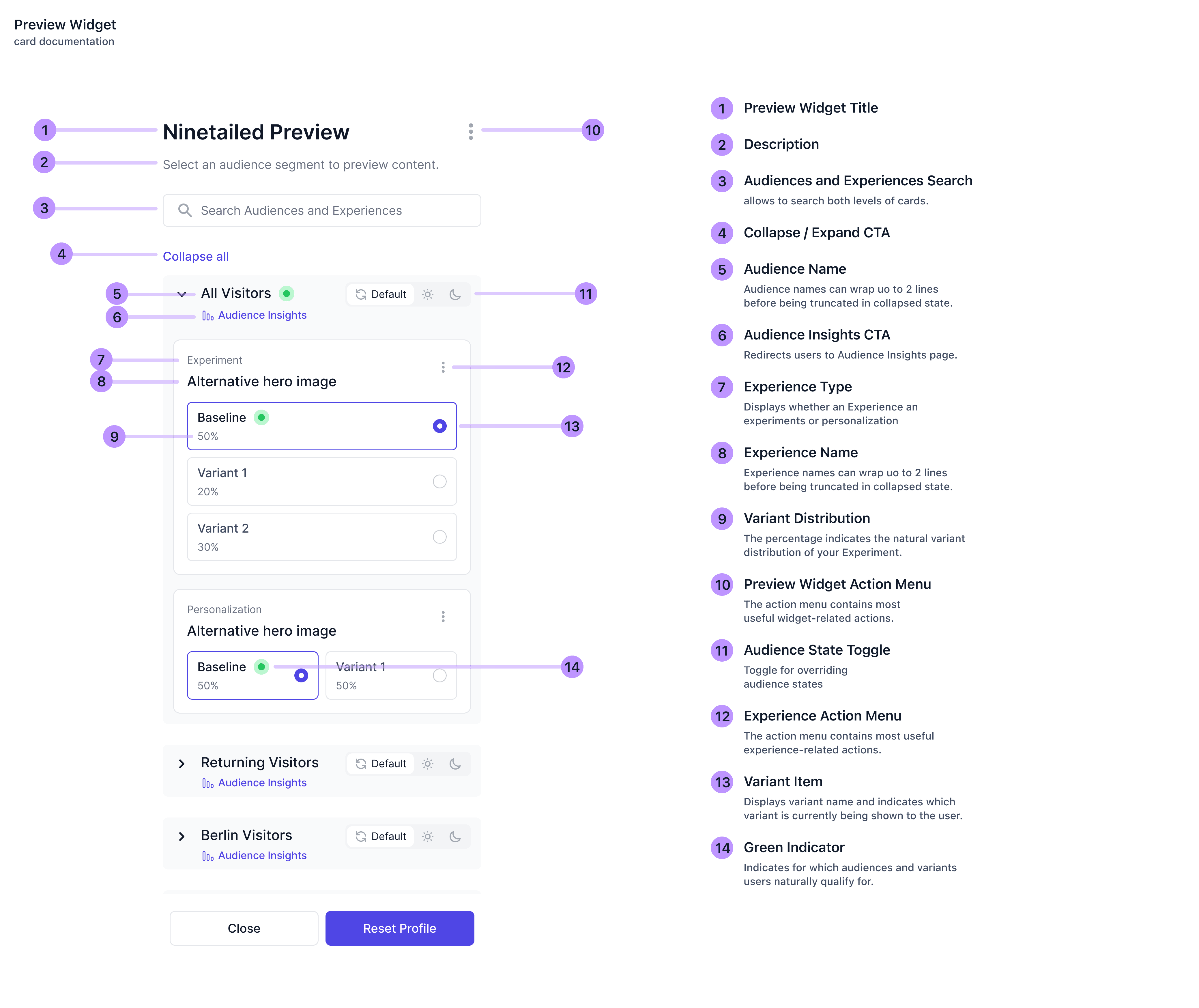
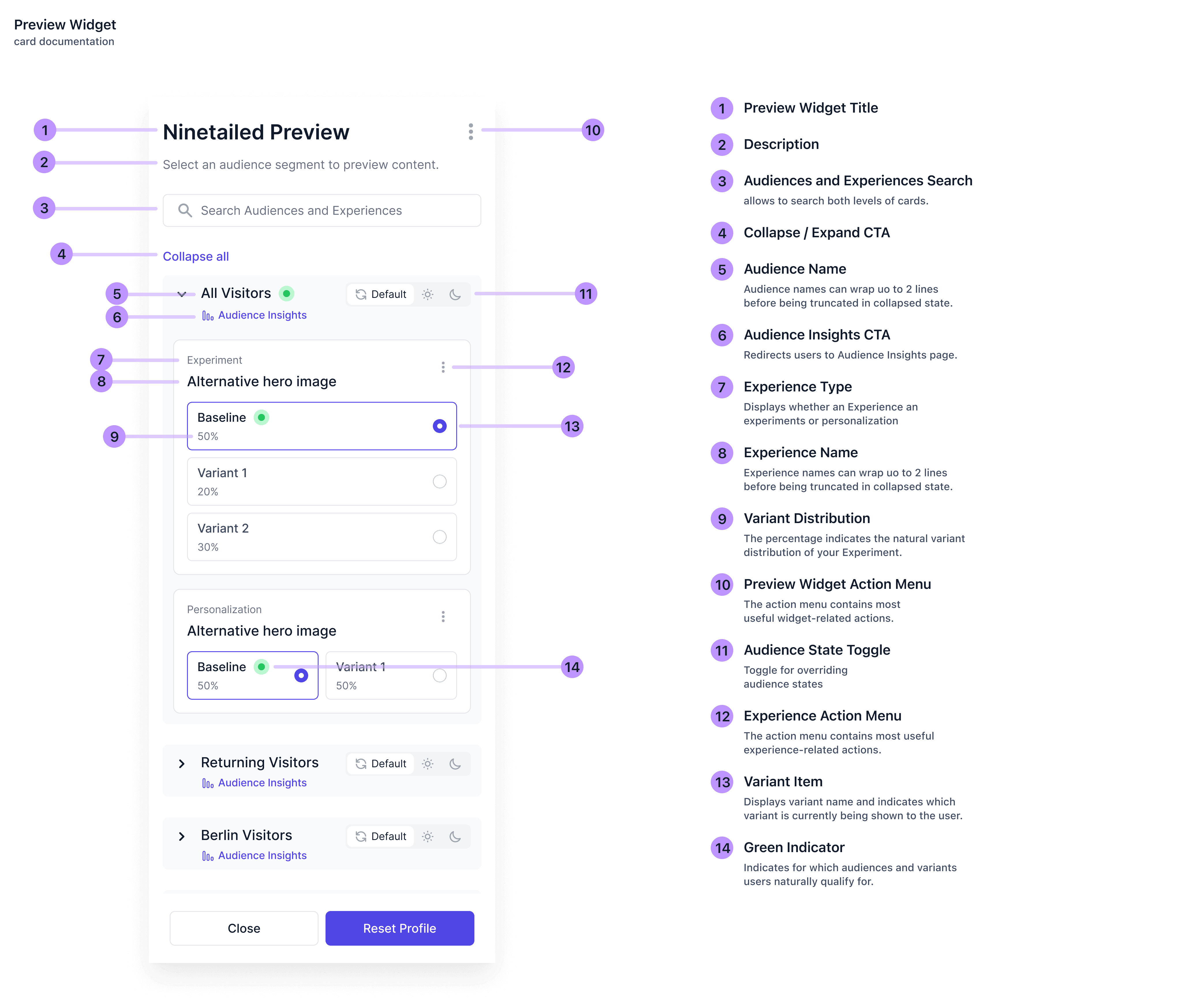
When users open the Preview Widget, they see all their available Audiences. Depending on configurations and their profile, users might already qualify for some of Audience segments, which are displayed via a green indicator. I added tooltips on hover to clarify this feature.
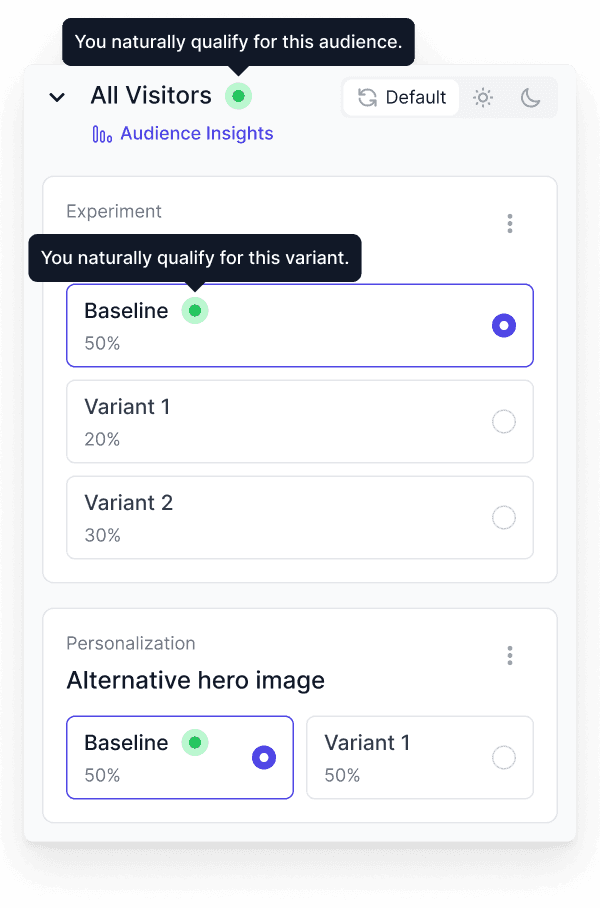
Users can override audience states by toggling the switch:
Default: This state naturally selects eligible Audiences based on user profiles and triggers.
On: Forces an Audience on, allowing the user to select variants even if not eligible.
Off: Forces an Audience off, even if they qualify.

Selecting Audiences
When users open the Preview Widget, they see all their available Audiences. Depending on configurations and their profile, users might already qualify for some of Audience segments, which are displayed via a green indicator. I added tooltips on hover to clarify this feature.
Users can override audience states by toggling the switch:
Default: This state naturally selects eligible Audiences based on user profiles and triggers.
On: Forces an Audience on, allowing the user to select variants even if not eligible.
Off: Forces an Audience off, even if they qualify.
Selecting Audiences
When users open the Preview Widget, they see all their available Audiences. Depending on configurations and their profile, users might already qualify for some of Audience segments, which are displayed via a green indicator. I added tooltips on hover to clarify this feature.
Users can override audience states by toggling the switch:
Default: This state naturally selects eligible Audiences based on user profiles and triggers.
On: Forces an Audience on, allowing the user to select variants even if not eligible.
Off: Forces an Audience off, even if they qualify.
Selecting Variants
If an Audience is turned on, users can choose which variant to display. The baseline shows what users in the holdout or control group see, and percentages reflect variant distribution.
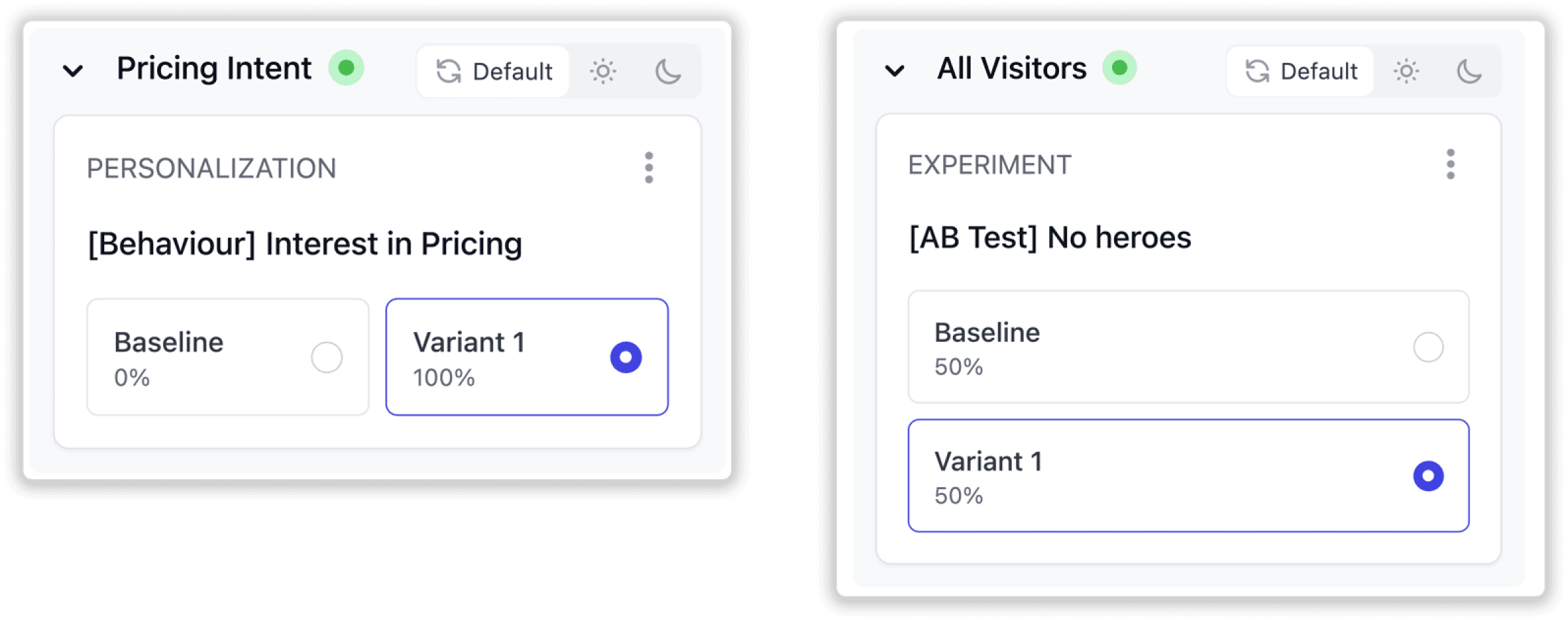
The decision to stack variant elements at the experiment card versus placing them side-by-side at the personalization card is based on user research. Analytics shown the number of variants per experiment was 2 or more whereas personalization can only have 1 variant.
Selecting Variants
If an Audience is turned on, users can choose which variant to display. The baseline shows what users in the holdout or control group see, and percentages reflect variant distribution.
The decision to stack variant elements at the experiment card versus placing them side-by-side at the personalization card is based on user research. Analytics shown the number of variants per experiment was 2 or more whereas personalization can only have 1 variant.
Selecting Variants
If an Audience is turned on, users can choose which variant to display. The baseline shows what users in the holdout or control group see, and percentages reflect variant distribution.
The decision to stack variant elements at the experiment card versus placing them side-by-side at the personalization card is based on user research. Analytics shown the number of variants per experiment was 2 or more whereas personalization can only have 1 variant.
Resetting Profile
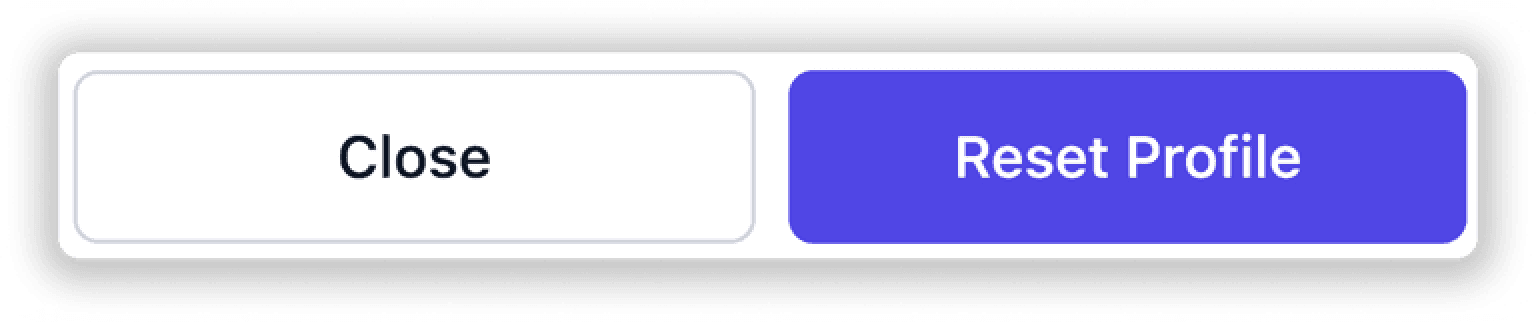
To allow users to test from a fresh state, I added a Reset Profile button. This resets their profile to its default state, clearing any audience triggers they may have set during testing.
Resetting Profile
To allow users to test from a fresh state, I added a Reset Profile button. This resets their profile to its default state, clearing any audience triggers they may have set during testing.
Resetting Profile
To allow users to test from a fresh state, I added a Reset Profile button. This resets their profile to its default state, clearing any audience triggers they may have set during testing.
Experience Action Menu
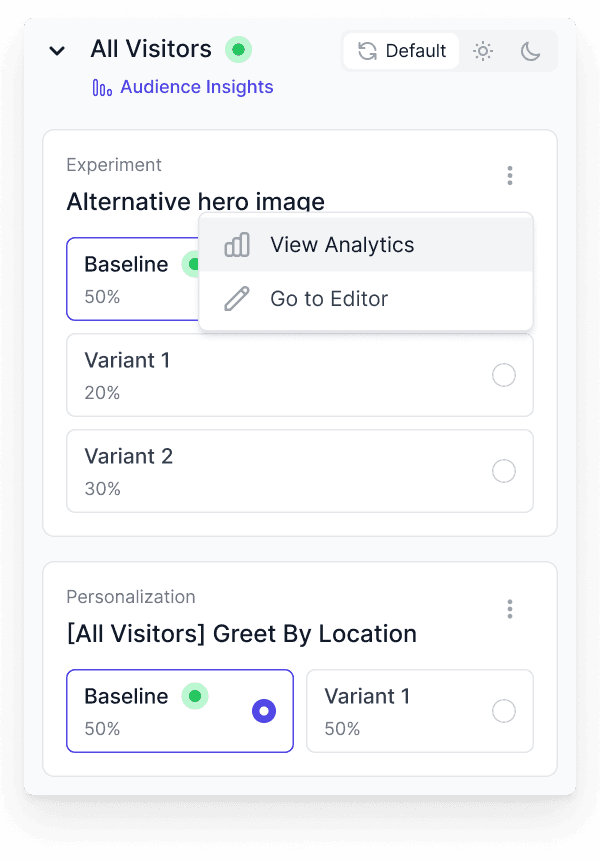
Previously, users couldn’t perform actions directly from the widget. I added an expandable action menu, enabling redirection to analytics and content editors. The menu was designed to accommodate future actions seamlessly.
Experience Action Menu
Previously, users couldn’t perform actions directly from the widget. I added an expandable action menu, enabling redirection to analytics and content editors. The menu was designed to accommodate future actions seamlessly.
Experience Action Menu
Previously, users couldn’t perform actions directly from the widget. I added an expandable action menu, enabling redirection to analytics and content editors. The menu was designed to accommodate future actions seamlessly.
Exploration
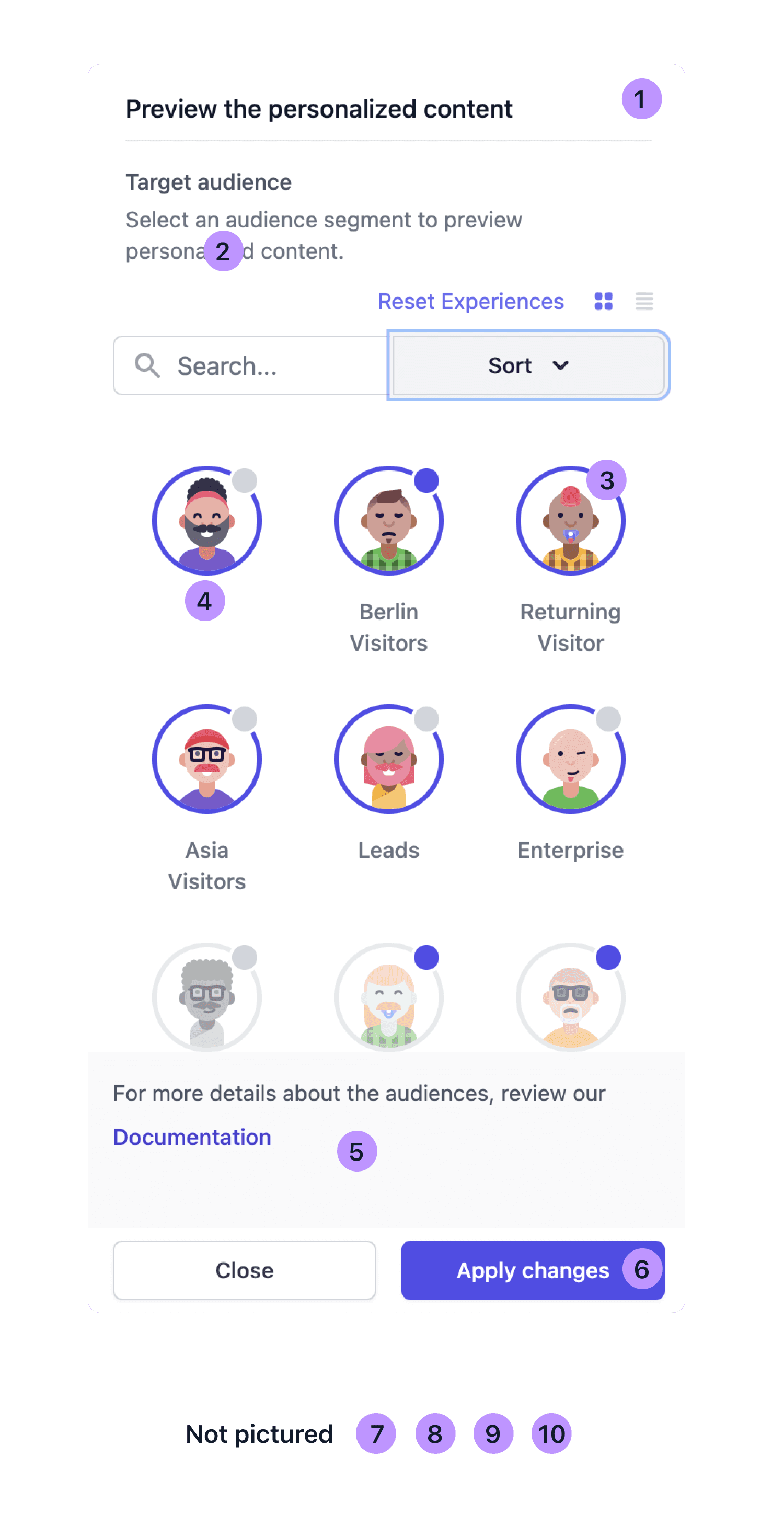
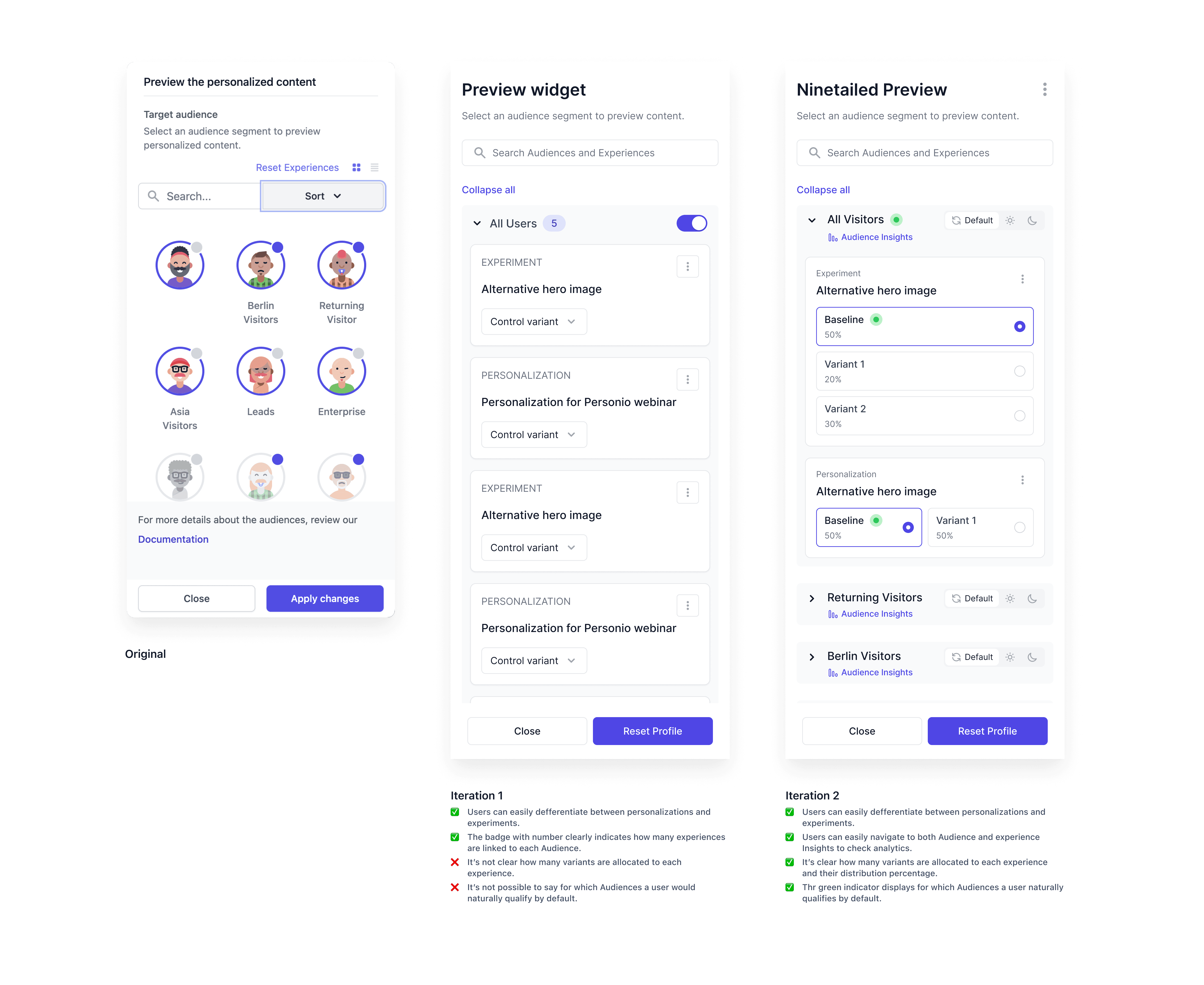
Design explorations focused on displaying multiple layers of data in a compact 400px-wide bar. After several iterations, I introduced a nested card system, allowing users to easily access both high-level and detailed data.
Here’s a look at some of the versions along the way:
Exploration
Design explorations focused on displaying multiple layers of data in a compact 400px-wide bar. After several iterations, I introduced a nested card system, allowing users to easily access both high-level and detailed data.
Here’s a look at some of the versions along the way:
Exploration
Design explorations focused on displaying multiple layers of data in a compact 400px-wide bar. After several iterations, I introduced a nested card system, allowing users to easily access both high-level and detailed data.
Here’s a look at some of the versions along the way:
Results
The A/B test showed a 32% increase in user interaction, affirming the redesigned widget’s improved usability. The integration with Contentful’s Live Preview made the widget a critical step in publishing workflows, aligning with our goal to close the loop between preview and publishing.
Results
The A/B test showed a 32% increase in user interaction, affirming the redesigned widget’s improved usability. The integration with Contentful’s Live Preview made the widget a critical step in publishing workflows, aligning with our goal to close the loop between preview and publishing.
Results
The A/B test showed a 32% increase in user interaction, affirming the redesigned widget’s improved usability. The integration with Contentful’s Live Preview made the widget a critical step in publishing workflows, aligning with our goal to close the loop between preview and publishing.
Summary
The redesigned Preview Widget empowered users to preview and test personalization and experimentation directly within their environment, simplifying complex decision-making and reducing cognitive effort.
Key takeaways:
Introduced modular UI patterns that reduced engineering effort and improved scalability.
Collaborated closely with Contentful’s product and engineering teams to align APIs, usability standards, and release timelines.
Leveraged A/B testing and analytics to validate changes and prove ROI through engagement metrics.
Ultimately, this work taught me how to make complex, data-driven systems feel intuitive, explainable, and human.
Summary
The redesigned Preview Widget empowered users to preview and test personalization and experimentation directly within their environment, simplifying complex decision-making and reducing cognitive effort.
Key takeaways:
Introduced modular UI patterns that reduced engineering effort and improved scalability.
Collaborated closely with Contentful’s product and engineering teams to align APIs, usability standards, and release timelines.
Leveraged A/B testing and analytics to validate changes and prove ROI through engagement metrics.
Ultimately, this work taught me how to make complex, data-driven systems feel intuitive, explainable, and human.
Summary
The redesigned Preview Widget empowered users to preview and test personalization and experimentation directly within their environment, simplifying complex decision-making and reducing cognitive effort.
Key takeaways:
Introduced modular UI patterns that reduced engineering effort and improved scalability.
Collaborated closely with Contentful’s product and engineering teams to align APIs, usability standards, and release timelines.
Leveraged A/B testing and analytics to validate changes and prove ROI through engagement metrics.
Ultimately, this work taught me how to make complex, data-driven systems feel intuitive, explainable, and human.